MailBot account creator updated to version 12.64.
Implemented unlocker of Yandex accounts locked by a password change request:
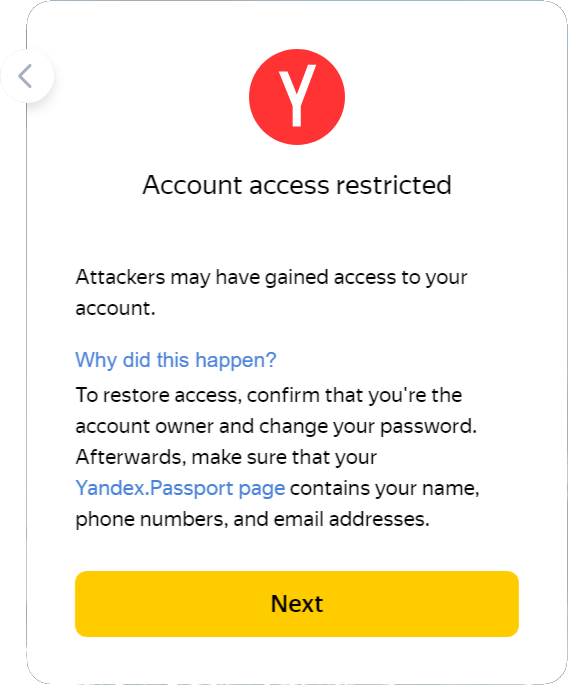
To unlock an account, you need to go through 4 steps:
- Solve a regular Yandex CAPTCHA image with Latin text.
- Answer the secret question correctly.
- Link a phone number via SMS verification.
- Set new password.
After completing all the steps, the account becomes fully operational (Yandex.Disk works, receiving/sending mail, etc.). To complete the second step, you will need to know the answer to the account secret question. Since version 12.64 MailBot exports the security question and the answer to it with the prefixes “SQ-” and “SQA-” respectivly, so that checker can correctly extract them from the account string (thanks to @Djekxa for the idea). It looks like this: Read more »
tavel
\\ MailBot, unlocker, checker, Yandex
MailBot has been updated to version 12.32.
Outlook
Starting from version 12.2, MailBot supports FunCAPTCHA solution in Outlook creator when creating an account:
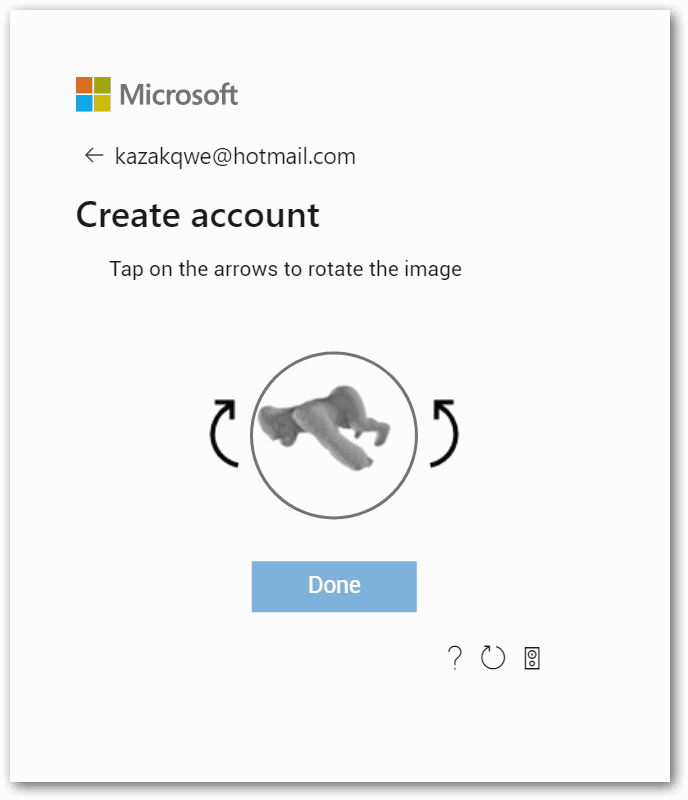
FunCAPTCHA variant with rotating animals that Outlook generates can be solved using 2Captcha and Anti Captcha (only via API v2) manual recognition services, as well as CapMonster Cloud. Other FunCAPTCHA variants (dice, shadows, galaxies, etc.) can only be solved by 2Captcha and Anti Captcha.
Important! Site owner with FunCAPTCHA installed (in our case, this is Outlook) has the ability to check whether IP address from which account creation requests come and IP address from which FunCaptcha was solved match. Therefore, it is very important to Read more »
tavel
\\ Antigate, AOL, CapMonster, funcaptcha, GMX.com, GMX.de, hCaptcha, Imagetyperz, IMAP, inbox.lv, Mail.com, MailBot, Outlook, POP3, ruCaptcha, SMTP, Web.de, Yahoo, creator, app password, proxy, forwarding, checker, Yandex
MailBot account creator updated to version 11.95.
According to numerous requests from customers, a new checkbox “Cookies” appeared on the “Export” tab in the “Save additional data” panel.
If it is checked, MailBot will create a folder with the name “lcookies” in the “Accounts” folder, create files with names like “tesskmo7kebert@rambler.ru.txt” in it, and in these files it will save the basic cookie params set by the server when creating current mail account.
Cookies export format is compatible with MailerKing.
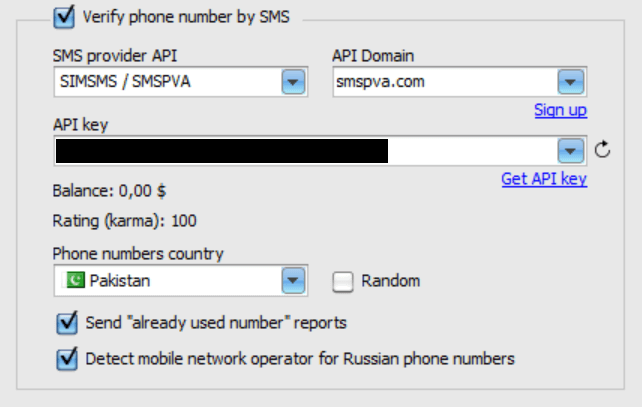
“SMS” tab now displays the rating/karma of your phone provider account.
For SMSPVA.com karma is displayed.
For SMS-ONLINE.pro – amount of frozen funds.
For getsmscode.com – account points.
Also implemented in MailBot 11.95:
tavel
\\ 5SIM, AOL, CheapSMS, cookies, GMX.de, IMAP, O2.pl, Onet.pl, Outlook, POP3, SIMSMS, SMS-Activate, SMTP, Tor, WP.pl, Yahoo, avatar, unlocker, карма, app password, Rambler, stats, экспорт, Yandex
MailBot account creator updated to version 11.37.
When the “Random country” setting is checked on the “SMS” tab, country list now contains checkboxes that allow you to specify specific countries from which a random one will be selected to get the phone number:
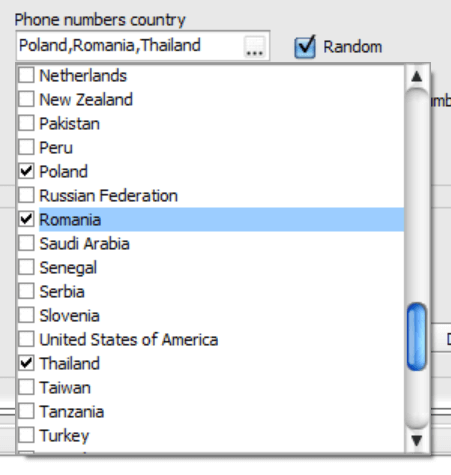
When you right-click on the “Phone numbers country” field, a context menu pops up with the items “Select all” and “Deselect all”, which allows you to select or deselect all countries in one action.
Also implemented in MailBot 11.37:
tavel
\\ CapMonster, CLI, GMX.de, IMAP, Mail.ru, MailBot, Meta.ua, O2.pl, Onet.pl, Outlook, POP3, SMS-Activate, SMS-MAN, SMS-ONLINE, SMTP, Web.de, WP.pl, avatar, creator, unlocker, Rambler, checker, login template, Yandex
MailBot account creator updated to version 11.11.
Implemented API of Vietnamese SMS service pvaonline.net / simthue.com:
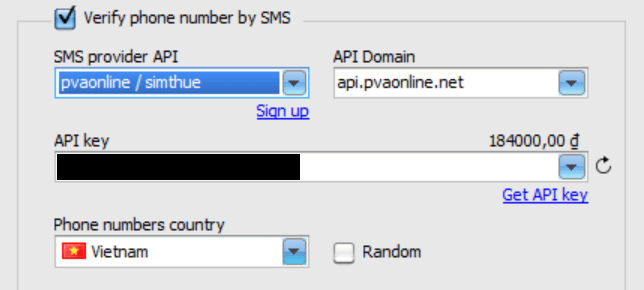
To date the service provides only Vietnamese phone numbers.
The price for 1 SMS for Outlook, Yahoo or AOL on December 26, 2019 is 1500 Vietnamese dongs, which is equivalent to $0.065.
Also implemented in MailBot 11.11:
- disabling antispam in Outlook creator and checker
- disabling antispam in Onet.pl checker
- O2.pl, WP.pl, Bigmir.net and NGS.ru checkers radically Read more »
tavel
\\ AOL, bigmir, MailBot, NGS.ru, O2.pl, Onet.pl, Outlook, POP3, PVA, pvaonline, simthue, SMTP, Web.de, WP.pl, Yahoo, antispam, checker, Yandex
Page 4 from 15« First«...23456...10...»Last »
|


 EzCaptcha — buy FunCaptcha Outlook/Twitter from $1.2/1K!
 RemProxy — budget, nimble proxies for any task
 The largest pool of residential proxies from $1.2. GEO. HTTP|SOCKS4/5
 MailerKing — best SMTP and webmailer ever!


